Meta: Verify your account in Ads Manager
This one looks scary, but it’s usually harmless. Meta has paused new ads on your account as a security precaution and just needs you to prove it’s really you. Once you do that inside Meta’s own Ads Manager, everything goes back to normal.
What you’ll see
Section titled “What you’ll see”We think someone may have tried to access your account without permission. For your protection, you won’t be able to create or modify ads until you authenticate your account in Ads Manager.
What this message means
Section titled “What this message means”Meta has put a temporary security checkpoint on your ad account. It’s a protection step — Meta wants the real account owner to confirm their identity before any new ads are created.
The important part: this can only be cleared inside Meta, by a person. markXpand (or any tool) can’t remove it through the connection, because the whole point of the check is that a human verifies themselves directly with Meta.
Why it happened
Section titled “Why it happened”- Meta noticed something it considered unusual (a new login location, a new tool connecting, or unusual activity) and switched on the safety check.
- It is not a ban and usually not about anything you did wrong — it’s a precaution. It typically clears as soon as you verify.
How to fix it — step by step
Section titled “How to fix it — step by step”- Open Meta Ads Manager (in your normal browser, signed in as the account owner): 👉 adsmanager.facebook.com
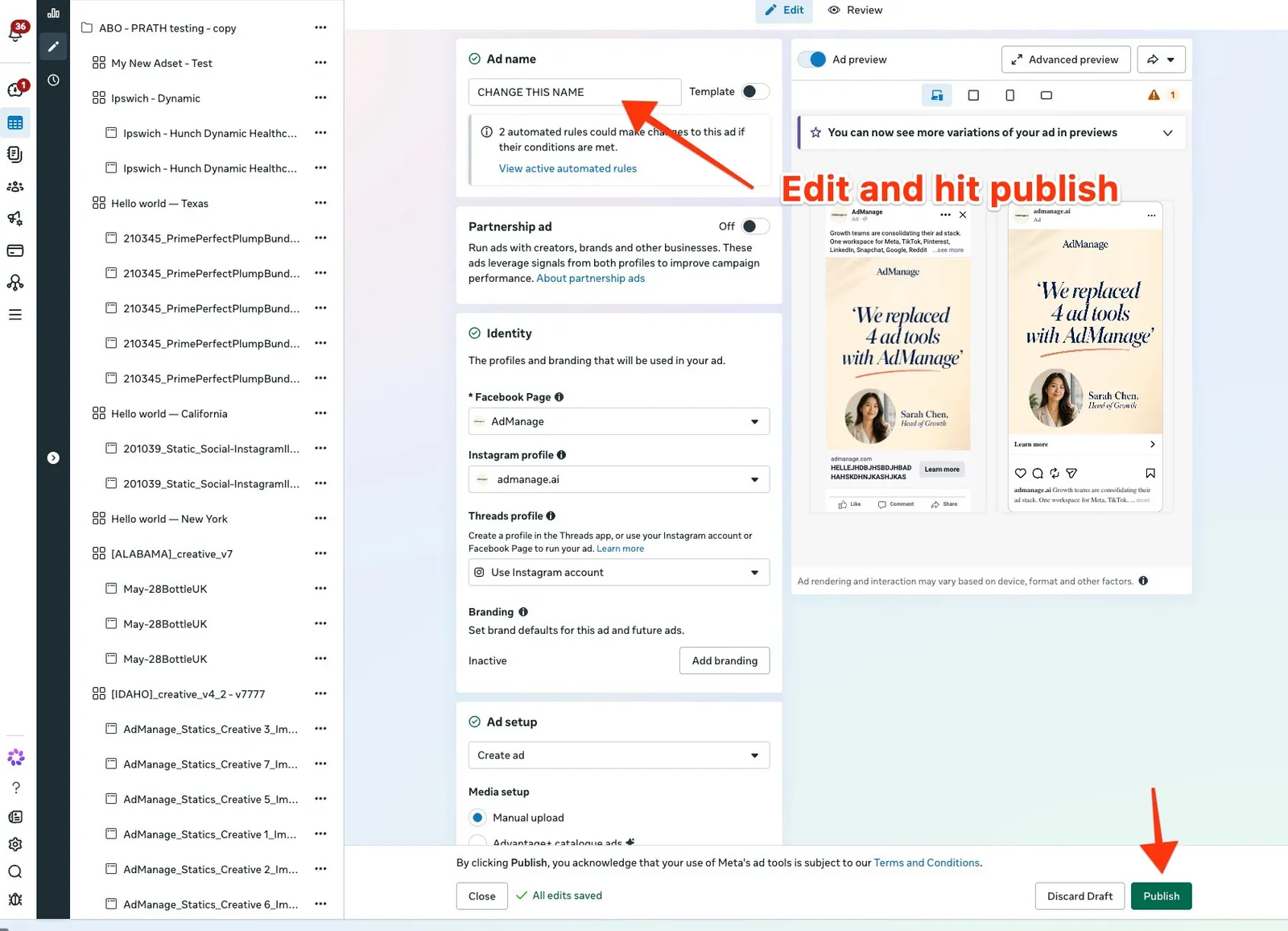
- Go to the Ads tab and open any existing ad (or create a quick draft ad).
- Make a tiny change — for example, edit the ad’s name — and click Publish.
- This triggers Meta’s “authenticate your account” prompt. Follow it — usually you’ll enter a 6-digit code Meta sends to your email or phone.
- Once Meta confirms you, return to markXpand and click Relaunch.
How to know it worked
Section titled “How to know it worked”After you finish the verification, Meta lifts the block immediately. The “authenticate your account” message disappears, you can edit ads normally in Ads Manager, and your campaign will launch when you click Relaunch in markXpand.
Still stuck?
Section titled “Still stuck?”If you’ve verified and the block is still there after a few minutes, let us help:
When you do, it helps to include:
- 🖼️ a screenshot of the error
- your ad account and campaign name