Meta: Accept the Lead Ads Terms of Service
Your lead campaign didn’t launch because Facebook needs your Page to accept one set of terms first. This is a quick, one-time step — most people fix it in under two minutes. Let’s walk through it.
What you’ll see
Section titled “What you’ll see”You can’t run lead ads until your Facebook Page accepts Facebook’s Lead Generation Terms of Service.
This shows up when you launch a lead generation campaign (a campaign that collects names, emails, or phone numbers through an instant form) on Facebook or Instagram.
What this message means
Section titled “What this message means”Lead ads collect personal information from people. Because of that, Facebook requires the owner of the Facebook Page to read and agree to a special “Lead Generation Terms of Service” before that Page is allowed to run any lead ads.
Think of it as a one-time consent form for the Page. Until someone accepts it, Facebook blocks every lead campaign from that Page — and there’s nothing markXpand can change on our side, because Facebook only lets a Page admin accept these terms.
Why it happened
Section titled “Why it happened”Usually one of these:
- This is the first lead campaign ever run from this Page, so the terms were never accepted.
- The terms were accepted on a different Page, but not the one you’re advertising from now (the terms are per-Page).
- The person who connected the account isn’t a Page admin (an “advertiser” or “editor” role can’t accept the terms).
How to fix it — step by step
Section titled “How to fix it — step by step”- Make sure you’re a Page admin. You need full admin access to the Facebook Page — not just advertiser access. If you’re not an admin, ask whoever owns the Page to do the steps below, or to make you an admin first.
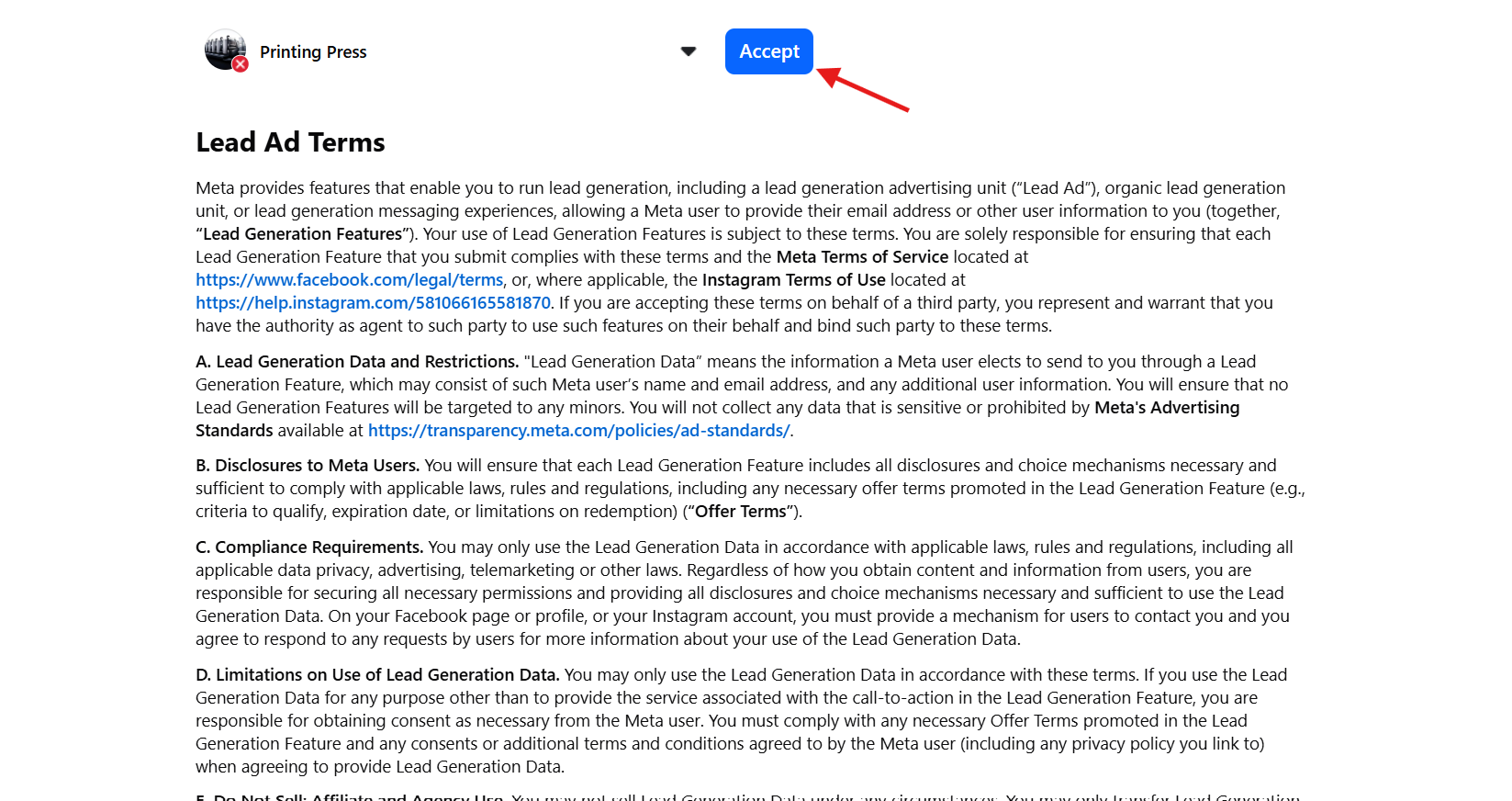
- Open the Lead Ads Terms page. Click here: 👉 facebook.com/ads/leadgen/tos (Make sure you’re logged into Facebook with the account that manages your Page.)
- Pick the right Page. At the top of that page there’s a dropdown listing your Pages. Select the exact Page you’re advertising from in markXpand.
- Read and accept. Review the terms, then click the Accept button.
- Come back to markXpand and click Relaunch on your campaign.
How to know it worked
Section titled “How to know it worked”Once you’ve accepted the terms, the dropdown will show the Page as accepted, and your campaign will launch normally when you click Relaunch in markXpand. You won’t be asked again for that Page.
Still stuck?
Section titled “Still stuck?”If you’ve accepted the terms and still see the error, wait about a minute (Facebook can take a moment to update) and relaunch. If it keeps happening, we’re happy to help:
When you do, it helps to include:
- 🖼️ a screenshot of the error
- the Page name and campaign name